 cad-agent.
cad-agent
Hardware design with AI agents, checked like engineering. cad-agent turns a folder of CAD scripts into a repeatable pipeline: build the parts, check the fit, simulate strength and airflow, and publish the evidence as print files, reports and a linked review site. It works with Claude Code first, plus Codex, Cursor and Gemini.
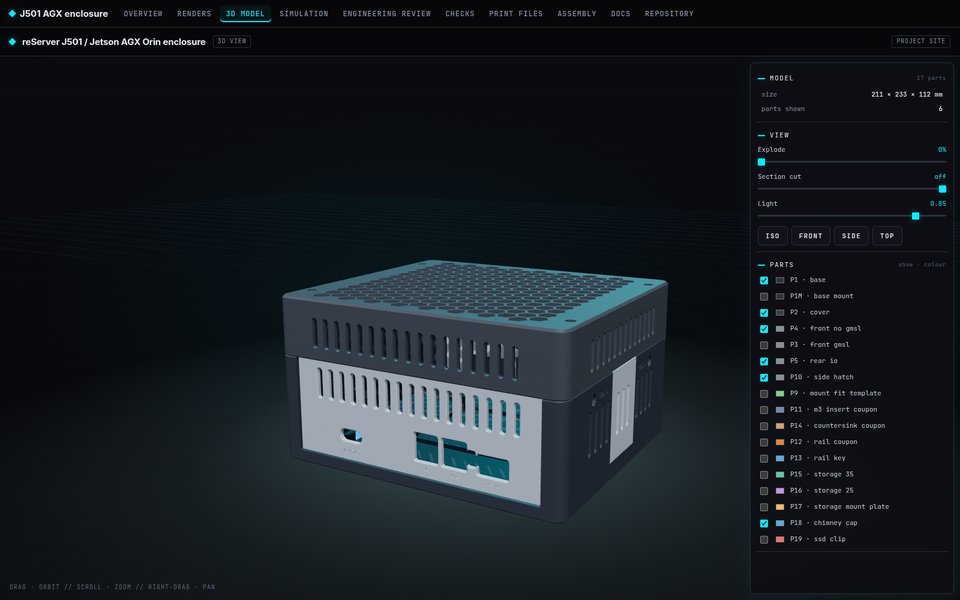 3D viewer and review site. Every part in place, with explode, section and one top bar linking every report. |
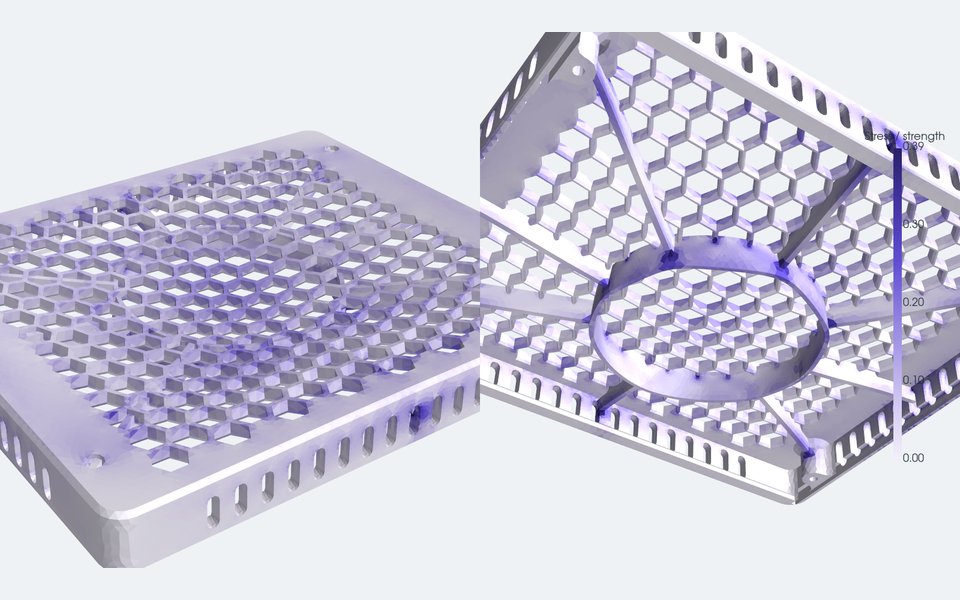 Strength. FEA of a ribbed lid under a 300 N press, coloured by stress as a fraction of the material's strength. |
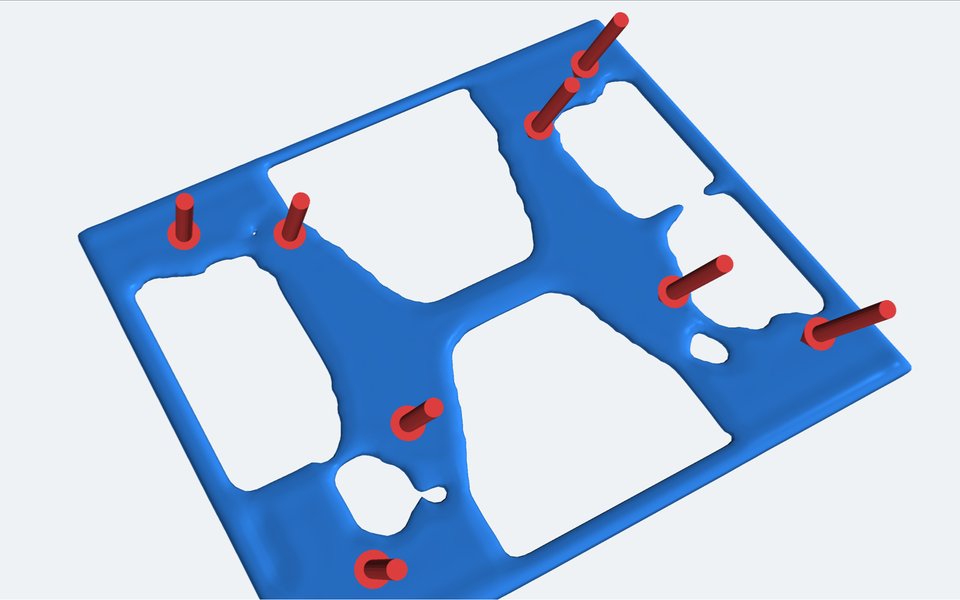 Less material. Topology optimisation keeps only the floor that carries load. |
How it works
A project describes itself in one cad-agent.yaml. cad-agent runs it and collects the proof.
flowchart LR
    P["📐 <b>Your project</b><br/>cad-agent.yaml<br/>CAD scripts · parameters"]
    B["🔧 <b>build</b><br/>CAD · checks · simulations<br/>run as ordered steps"]
    M["🖨️ <b>export-3mf</b><br/>bed-centred 3MF<br/>read back and verified"]
    R["✅ <b>check + report</b><br/>every result, pass or fail<br/>with its evidence"]
    Z["📦 <b>package</b><br/>review zip<br/>sha256 manifest"]
    W["🌐 <b>site --serve</b><br/>linked review site<br/>3D viewer · live reload"]
    P --> B --> M --> Z
    B --> R --> Z
    R --> W
    classDef src fill:#1f2933,stroke:#e8892b,color:#f5f7fa
    classDef step fill:#0e3a43,stroke:#00b8c8,color:#f5f7fa
    classDef out fill:#2a2440,stroke:#9d7bff,color:#f5f7fa
    class P src
    class B,M,R step
    class Z,W out
cad-agent all runs build, export-3mf, check, report and package in one go. It never claims a physical fit. A check
either has evidence or it says what is assumed.
PCB and enclosure workbenches: PCB workflow covers embedded schematics, copper layers, assembly views and housing renders in the status page; native KiCad ERC/DRC/parity evidence; source freshness; and JLC BOM/CPL checks. Use cad-agent pcb-check to bind reports to source files. Qualification gates stay separate from CAD checks.
What's in the box
flowchart LR
    D["✏️ <b>Design</b><br/>connectors · mcmaster<br/>robot · geometry · explore"]
    V["🧪 <b>Verify</b><br/>fea · cfd · heatsink<br/>topopt · slicer"]
    S["🖼️ <b>Show</b><br/>render · simviz · reports<br/>site · 3D viewer"]
    P["📦 <b>Ship</b><br/>STL · STEP · 3MF<br/>hashed review zip"]
    D --> V --> S --> P
    classDef g fill:#14232b,stroke:#3a8fa3,color:#e8edf5
    class D,V,S,P g
| Module | What it gives you | |
|---|---|---|
| ✏️ | connectors |
Port windows derived from the modelled mating plug, then a sweep check that the plug really goes in |
| ✏️ | mcmaster |
The manufacturer's STEP and specs for a McMaster-Carr part number, normalised for assembly |
| ✏️ | robot |
Mass properties from CAD, links and joints, URDF and MuJoCo export, meshes kept under budget |
| ✏️ | dossier |
The design dossier: requirements, sections, part spec cards, interfaces and decisions with the alternatives rejected, in YAML with file:line errors; build-script declarations of parts, cavities, joints, fasteners and assembly steps, exported for the gates; a lint and a per-section status (draft to signed off, voided when the geometry changes) from cad-agent dossier (guide) |
| ✏️ | gates |
Integrity gates on the assembly: floating parts and unrealised interfaces, items outside their cavity, fastener seat, engagement, tip and tool reach, motion-range collisions, assembly order and access, minimum walls. cad-agent gates runs them in parallel processes, writes verdicts bound to the geometry they checked, and check fails on a failing or stale one (guide) |
| ✏️ | explore |
Part catalogues with prices and sources, designs that pick a part per slot, the project's own evaluator, Pareto ranking of the trade-offs, one-part swaps and a search over parts and parameters (guide) |
| 🧪 | fea |
gmsh + scikit-fem linear elasticity with printed-material allowables, checked against textbook cases |
| 🧪 | compliant |
Snap-fit sizing and checks (cantilever, torsion, annular) by the Covestro/Bayer method, tested against the guide's worked examples; allowable strain for moulded resins and, by print direction, for 13 filaments from their datasheets (guide) |
| 🧪 | cfd |
Conjugate heat transfer cases for OpenFOAM written from CAD: fans, fin blocks, heat sources |
| 🧪 | heatsink |
Plate-fin correlations, fan operating point and porous-block coefficients for CFD |
| 🧪 | topopt |
pyMOTO topology optimisation (SIMP, MMA, overhang filter) to cut filament where it does no work |
| 🧪 | slicer |
Bambu Studio's command line for real filament grams and print time |
| 🖼️ | render, simviz |
Off-screen renders, stress and flow pictures, MP4 animations; a review packet per dossier section (solid, x-ray, cuts through cavities, joints and screws, exploded along the assembly steps, joint range ends, gate findings at their witness points) with the measurements first and the render checklist, from cad-agent review-packet (guide) |
| 🖼️ | report, simreport |
Results JSON and standalone HTML reports that name their limits |
| 🖼️ | site, view, webkit |
A local review site with progress, decisions, docs and a 3D viewer, all under one top bar |
| 📦 | mesh3mf, package |
3MF writing with an independent read-back, and a hashed review zip |
The full guide, the cad-agent.yaml format and every command are in docs/toolkit.md.
Quick start
git clone https://github.com/Valpatel/cad-agent && cd cad-agent
pip install -e ".[cad]"                      # add fea, sim, robot, site as needed
cad-agent all --project path/to/your-project  # build, 3MF, check + report, package
cad-agent site --serve --project path/to/your-project
| Extra | Adds |
|---|---|
cad |
CadQuery, trimesh, VTK: building, checking and rendering parts |
fea |
gmsh, scikit-fem, PyPardiso: stiffness and strength |
sim |
PyVista, pyMOTO, manifold3d: airflow cases, topology optimisation, pictures and videos (OpenFOAM and Bambu Studio run as separate programs) |
robot |
MuJoCo, for robot export |
site |
Markdown, for the review site |
explore |
optuna, for the NSGA-II and TPE searches of cad-agent optimise (random and grid need nothing) |
Built with cad-agent
| Project | What it is |
|---|---|
| J501 AGX enclosure | A printed enclosure for the Seeed reServer J501 with a Jetson AGX Orin: port windows from mating plugs, FEA, airflow and topology-optimised floor vents |
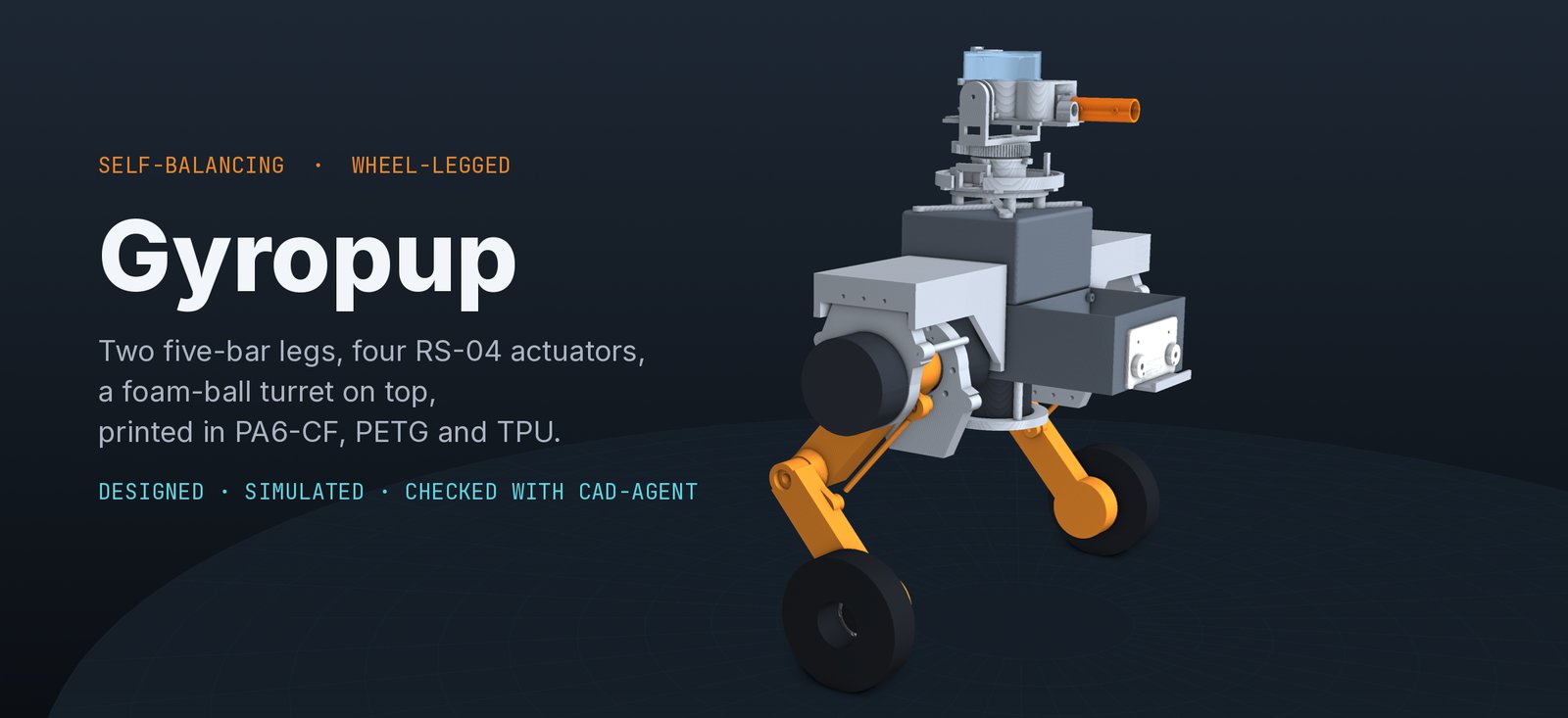
| Gyropup | A self-balancing wheel-legged robot with a foam-ball turret: five-bar legs, McMaster hardware, strength and fall studies |
| AGX Thor CAN boards | PCB and enclosure reviews |
Anything specific to one product stays in that product's repository. cad-agent only holds what every project can use.
How cad-agent grows
flowchart LR
    A["🔎 <b>Adopt</b><br/>the best public tools,<br/>pinned and security-reviewed"]
    L["🧠 <b>Learn</b><br/>rules mined from real<br/>design sessions"]
    E["📏 <b>Evaluate</b><br/>tasks with machine-checked<br/>acceptance criteria"]
    G["🧩 <b>Fill the gaps</b><br/>only what nobody<br/>else provides"]
    A --> E
    L --> E
    E --> G
    G -.->|upstream PRs| A
- Adopt. Six upstreams are vendored under
vendor/, pinned by commit, scanned and updated weekly through a reviewed process (SECURITY.md,WEEKLY-UPDATE.md): text-to-cad, kicad-happy and kicad-mcp-pro (MIT), and build123d-mcp, agentcad and bd_warehouse (Apache-2.0). OpenFOAM (GPL) and Bambu Studio (AGPL) run only as separate programs. gmsh (GPL) is imported, but only by the optionalfeaextra. Licences are inTHIRD_PARTY_NOTICES.md. - Learn.
lessons/holds eleven sets of rules mined from real design sessions, each citing its source. They cover verifying from source, connectors, fasteners, evidence, simulation and material. - Evaluate, then fill the gaps. Each tool is scored on the same tasks. What wins gets adopted, the gaps go upstream, and only what nobody else provides lives here.
Contributing
Several projects and AI agents use cad-agent at once, so every change goes through a pull request.
gitGraph
    commit id: "v0.1"
    branch dev
    checkout dev
    commit id: "integration"
    branch feature
    checkout feature
    commit id: "change + tests"
    commit id: "review fixes"
    checkout dev
    merge feature id: "PR: CI + review"
    checkout main
    merge dev id: "release PR" tag: "vX.Y.Z"
- Work in your own worktree on
feat/<topic>, branched fromdev. - Open a PR into
dev. CI runscoreon Python 3.10 and 3.12, andfullwith every extra. - A person or a separate review agent reviews it. Every comment is answered and resolved before the merge.
- Releases go from
devtomainby PR. Both branches are protected.
Details are in CONTRIBUTING.md. Rules for AI agents are in AGENTS.md.
Layout
| Folder | What is in it |
|---|---|
src/cadagent/ |
The toolkit, with its web kit in webkit/ |
tests/ |
The test suite, which also runs in CI |
docs/ |
toolkit.md, the guide to the toolkit, explore.md, design exploration, and dossier.md, the design dossier |
examples/ |
Worked examples: explore-two-wheel compares robot configurations |
skills/, agents/ |
Agent skills and subagents for Claude Code and Codex: work tracking, PR review, remote runs, the section-by-section design process (design-process) and McMaster parts (agent workflow; cad-agent agents install) |
lessons/ |
Rules mined from design sessions, with their sources |
research/ |
Landscape surveys, including the simulation tools |
upstreams/, vendor/ |
The tool registry and the vendored, pinned upstreams |
tools/, mining/ |
Vendor sync, security scan and the local session miner |
License
MIT. See LICENSE. Vendored code keeps its own licence, listed in
THIRD_PARTY_NOTICES.md.